



I’m a freelance video editor based in Peekskill, New York, and I’ve worked with everything from old home videos to modern digital content. A few months ago, I came across a dusty box of old VHS and MiniDV tapes in my parents’ garage. These were full of family memories — birthdays, soccer games, and stories from my grandparents.
I knew from experience how fragile old tapes can be, so I wanted to digitize them before they were lost forever. I first tried using my own gear at home, but it didn’t go as planned. That’s when I started looking into professional digitizing services like iMemories and Legacybox.
In this post, I’ll share my full experience — from shipping the tapes, to the quality of the digital files, to whether I’d recommend using a service like this for preserving your own family memories. I’ll keep it honest and simple, so you know what to expect before you send in anything important.
A few months ago, I was cleaning out my parents’ garage when I found an old dusty box. Inside were our family’s VHS and MiniDV tapes — birthday parties, soccer games, and even my grandparents telling stories. I didn’t want to lose these memories, so I started looking for a good way to turn the tapes into digital videos before they got damaged.
I also found something else — a few old PS3 games like LEGO Batman, WALL-E, and TRON: Evolution. It was a fun surprise and brought back a lot of memories. I’ve already listed them for sale on Craigslist.

While searching for the best way to save the videos, I saw one company mentioned a lot. I decided to try it out. I sent in six tapes and also tested two other popular services to compare the results. In this review, I’ll share what I learned — how much it cost, how long it took, and how good the videos looked.
I’ve tried more than a dozen ways to save old videos — from DIY kits to professional services. I may earn a small fee if someone uses my links, but I always give honest reviews. I look at things like price, ease of use, and how well it actually works.
Let’s go over what this service does well, what could be better, and if it’s worth it to save your family’s memories.
TL;DR – Quick Summary
I chose iMemories because they had more reviews and an easy process. I ordered their MemoryBox, packed 6 tapes, and shipped it from Peekskill, NY to Arizona. It took about 40 days total to get my tapes back and see the digital versions online.
The quality was okay — the MiniDV tapes looked better, while the VHS tapes were grainy, which is expected for their age. The tapes were returned safely, and nothing was damaged. Online viewing worked well.
If you want to save your tapes without doing it yourself, iMemories works as promised — just be ready to wait a few weeks, and know that very old tapes won’t look brand new.
My First Attempt: Trying to Convert Tapes at Home with an Old Setup
Before I decided to send my tapes to a professional service, I actually tried converting them myself at home. I found this old setup in storage — a LaserKaraoke CD-G player hooked up to a tiny Haier monitor. I remembered using it years ago to play CDs and watch old movies, and I figured, why not try to use it to digitize the tapes?
It was a real throwback. The machine still worked, surprisingly, and I was even able to get video playing on the little screen using the yellow, red, and white RCA cables. Just seeing the footage come to life again gave me a wave of nostalgia. It reminded me of late nights with my siblings, flipping through tapes and CDs.
But here’s the truth — it wasn’t easy.
The Challenges:
- The machine is really old, so the picture quality wasn’t great.
- I had no idea how to connect it properly to a computer to record the video.
- Most modern laptops don’t even have the ports needed to make it work.
- I tried using a cheap converter I found online, but the audio and video didn’t sync right, and sometimes the footage would just freeze.
I spent hours trying to figure it all out — reading forums, watching YouTube tutorials, unplugging and replugging cables over and over again. After two days of frustration and still no usable digital files, I realized this just wasn’t going to work the way I hoped.
Pros of using the old setup:
- It was free (already had it).
- Gave me a chance to test if the tapes still worked.
- It was fun to see some clips again.
Cons:
- Way too outdated to connect easily with modern devices.
- Low video quality.
- No way to record or save the footage properly.
- Super time-consuming and frustrating.
That’s when I knew I needed a better solution — something easier and more reliable. That’s what pushed me to try out a few professional services and see which one was actually worth it.
Looking Into iMemories and Legacybox
After trying to convert the tapes at home and running into problems, I started looking for a service that could do it for me. Two names kept coming up in my search — iMemories and Legacybox. Both offer a similar service where you send your old tapes in a box, and they digitize them so you can watch them on your computer, phone, or TV.
I read through a bunch of reviews for both companies. Some people liked Legacybox for how simple the process was. Others said iMemories had better customer service and faster turnaround times. To get a better idea, I called iMemories directly. Someone picked up quickly and explained everything clearly — how to pack the box, what formats they accept, how pricing works, and how long it usually takes.
They were friendly and didn’t push me to buy anything extra. It was helpful to talk to a real person and get answers to my questions. Based on that call and the info I found online, I decided to try out iMemories first. But both companies seem to have their pros and cons, depending on what you’re looking for.

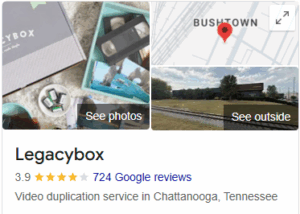
Looking at Reviews and How Far They Are From Me
Before I chose which company to send my tapes to, I looked at their Google reviews and where they are located. iMemories has a 4.7-star rating with about 4,000 reviews, and they are in Arizona. Legacybox has a 3.9-star rating with around 700 reviews, and they are in Tennessee.
I live in Peekskill, New York, so I checked how far they are from me. iMemories is about 2,400 miles away, and Legacybox is around 850 miles away. That made me think. These are my only copies of family memories, and I was a little worried about mailing them so far.
Legacybox is closer, which could mean faster shipping and less chance of anything getting lost. But iMemories has better reviews and more people talking about it. So I had to choose between one that’s closer to home and one that more people seem to trust.
Getting the iMemories Box (Safety Kit)
After I ordered from iMemories, their safety kit, called the MemoryBox, came in the mail a few days later. It looked really nice and was made for shipping old tapes safely. The box was strong, with black and orange colors, and had the iMemories name right on the top.
Inside the box, there were:
- Soft bubble bags to wrap each tape
- Sticky labels with barcodes for each item
- Clear step-by-step instructions
- A prepaid return label so I didn’t need to pay for shipping back
It was all packed really well and easy to understand. I just put one tape in each bubble bag, stuck the label on, and placed them all back in the box. I felt safe sending it because it was clearly made to protect old tapes.
I sealed the box and dropped it off at UPS. It felt good knowing my memories were packed safely.
Shipping the Box, Waiting, and Worrying About Insurance
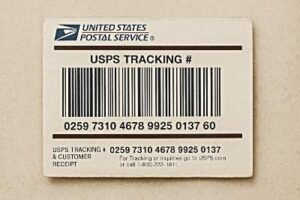
After I packed everything in the iMemories box, I was ready to send it out. The box came with a prepaid UPS shipping label, so I didn’t have to pay anything extra to ship it. I dropped it off at a nearby UPS store in Peekskill, which was quick and easy.
Still, I had some worries. These were my only copies of old family videos, so I kept thinking: What if the box gets lost or damaged? I asked the UPS worker if there was any insurance included. They told me iMemories includes $500 of shipping insurance, but if I wanted more, I’d have to buy it myself. I thought about it but ended up not adding extra, though now I wish I had — just for peace of mind.
Once the box was shipped, I got a tracking number and started checking it every day. It took about 4 days to reach their location in Arizona, which felt long since it was traveling over 2,000 miles. Then came the hard part: waiting. iMemories says the full process can take a few weeks, depending on how many items you send.
During that time, I worried a little — mostly hoping the tapes arrived safely and didn’t get lost in transit. I kept the receipt, tracking number, and took photos of everything I packed, just in case
Getting My Tapes Back and First Impressions (With Dates)
I shipped out my MemoryBox from Peekskill, NY on September 18, 2025, using the prepaid UPS label that iMemories provided. According to the tracking info, it arrived at their facility in Scottsdale, Arizona on September 23. After that, I didn’t hear much for a little while.
On their website, iMemories says the process can take about 2 to 3 weeks, but for me, it ended up taking closer to 4 weeks. I got a confirmation email that my tapes were done on October 20, and the return package was shipped back to me on October 22. I finally received the box at my door on October 28 — about 40 days after I first sent it.
When I opened the box, everything was packed the same way I sent it. My 6 tapes (3 VHS, 3 MiniDV) were still in their bubble wrap bags with the barcode stickers. Nothing was broken, missing, or damaged. They also included a little card letting me know I could now log in to watch my digital videos online.
Even though the wait was longer than I expected, I was relieved to see my tapes came back safe. These are memories you can’t replace, so it felt good to know they were handled carefully — even with the delay.
Watching the Digitized Tapes – Honest Thoughts
A day after my tapes were marked as returned, I got an email from iMemories saying my videos were ready to view online. I logged into my account and saw all six tapes listed, each one with a short preview and a title like “VHS Tape 1” or “MiniDV 3.”
Watching them felt a bit emotional, but I also paid close attention to the video and sound quality. Some of the tapes looked pretty clear, especially the newer MiniDV ones. The colors were decent, the picture didn’t skip, and the sound was in sync. These were the best-looking ones.
The VHS tapes, on the other hand, were a bit rough — which I expected. Some had lines on the screen, and a few spots were fuzzy or dark. But I don’t think that was iMemories’ fault. These tapes are 20+ years old, and even when we watched them years ago, they didn’t look perfect.
The files played fine online, and I liked that I could stream them right away without needing to download anything. The player worked well on both my phone and laptop. iMemories also gave me the option to order a USB or DVD, but I didn’t do that yet.

My honest opinion:
- Video quality: Decent overall. MiniDV looked good. VHS was lower quality but expected.
- Sound: Mostly clear. A little muffled on the old tapes, but still understandable.
- Online viewing: Easy and fast. No tech issues.
- Editing or clean-up: None that I noticed — they didn’t enhance the videos, just transferred them as-is.
Would I Recommend It?
If you just want your tapes digitized safely, and you understand that old footage can only look so good, then yes — iMemories gets the job done. They don’t add filters or improve the video, but they handle everything with care and make it easy to view and share the files.
If you’re expecting perfect picture quality or HD results, you might be disappointed — especially with VHS. But for most people who just want to save family memories before it’s too late, this service does what it promises.